The DUNS (Data Universal Numbering System) is an international company identification number. This number is assigned by Dun & Bradstreet (D&B).
In SafeTender, you can enter this DUNS number if your company is not based in France or the European Union.
Instead of the DUNS number, you can enter an identifier of up to 18 characters, such as your company name.
To ensure that new users are automatically grouped with your company when they register:
- It is essential to use the same company ID (SIRET number for French companies, intra-community VAT number for companies in the European Union outside France, etc.) as the one already registered with SafeTender.
- They should preferably have an email address with the same domain as the first registered user. The domain of an email address is what comes after @ (e.g. @lademat.pf). If the domain is different, the first user registered for the company must authorise the other users in the Sourcing module (https://sourcing.safetender.com).
This allows the platform to associate accounts with the same entity.
When you register your company on the SafeTender platform for the first time, you automatically register your company on the Sourcing platform. You will then receive two password initialisation emails:
- An email to initialise your password on SafeTender
- A second email to initialise your password on Sourcing as your company’s account administrator.
The login is the same for both platforms.
If a second user registers for your company, they will only receive one email to initialise their password on SafeTender.
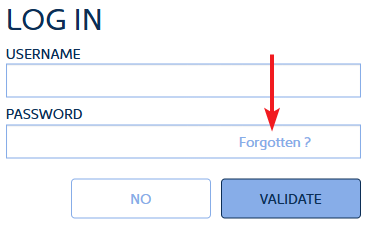
To reset your password, click on Forgotten? next to the password field.
You will then be asked to enter:
- The country of the company (as indicated during registration)
- Depending on the country, you will be asked for the company ID. For France, this is the SIRET number. It must be the SIRET number provided during registration
- Finally, you must enter the email address provided during registration
If all this information is correct, an email will be sent to reset your password. This email also contains your login ID.
If you made a mistake in your email address when registering, you will not be able to reset your password. In this case, please contact our support team.
Please do not hesitate to contact our support team if you encounter any problems.
To log in, you need a login name and password.
Please note: your login name may be different from your email address.
To reset your login details, click on Forgotten? in the password text box.
Yes. You have two options:
- You can request a password reset link. You will receive a link by email to reset your password.
- Or, if you are having difficulties, our support team can assist you directly in changing your password, in cooperation with you.