

Account and registration
- You can request a password reset link. You will receive a link by email to reset your password.
- Or, if you are having difficulties, our support team can assist you directly in changing your password, in cooperation with you.
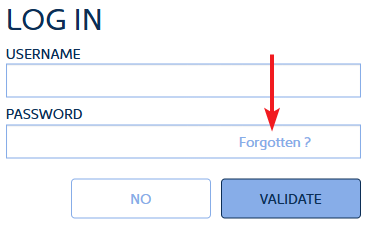
To log in, you need a login name and password.
Please note: your login name may be different from your email address.
To reset your login details, click on Forgotten? in the password text box.
- The country of the company (as indicated during registration)
- Depending on the country, you will be asked for the company ID. For France, this is the SIRET number. It must be the SIRET number provided during registration
- Finally, you must enter the email address provided during registration
- An email to initialise your password on SafeTender
- A second email to initialise your password on Sourcing as your company’s account administrator.
If a second user registers for your company, they will only receive one email to initialise their password on SafeTender.
- It is essential to use the same company ID (SIRET number for French companies, intra-community VAT number for companies in the European Union outside France, etc.) as the one already registered with SafeTender.
- They should preferably have an email address with the same domain as the first registered user. The domain of an email address is what comes after @ (e.g. @lademat.pf). If the domain is different, the first user registered for the company must authorise the other users in the Sourcing module (https://sourcing.safetender.com).
Instead of the DUNS number, you can enter an identifier of up to 18 characters, such as your company name.
Communicate with the buyer during the consultation
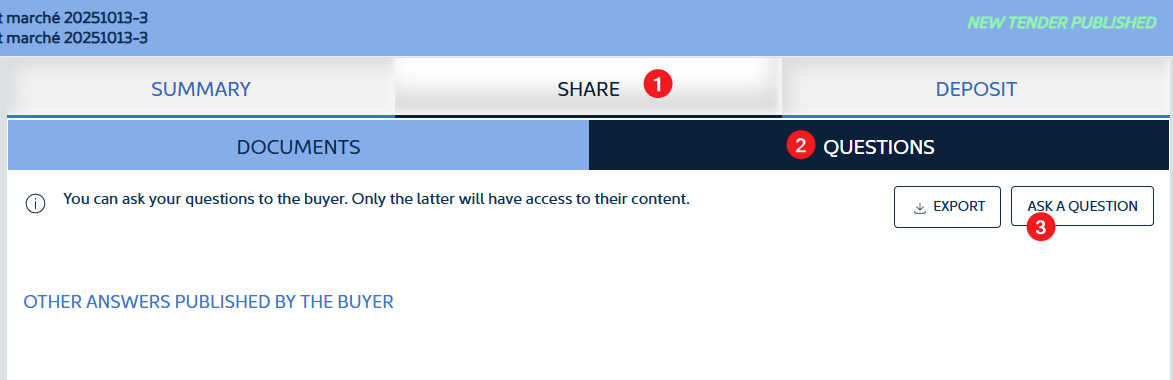
To ask a question about a consultation, you must log in as a supplier and then go to the consultation.
- Click on DOCUMENTS AND QUESTIONS
- Then click on QUESTIONS
- Finally, click on ASK A QUESTION and enter your question
- You are not logged in with a username: questions can only be asked when logged in.
- The buyer has set a deadline for asking questions and this deadline has passed.
How to respond to a consultation
It is preferable to use the simplified deposit mode without Java. However, if any of the files in the deposit exceed 1 GB, it is mandatory to use Java for the deposit.
For security reasons, it is preferable to have the latest version of Java.
No, this is a late submission. To be valid, the entire submission must be completed before the deadline specified in the consultation rules.
No, there is no limit. If one of the files is larger than 1 GB, you must use the repository with Java. Otherwise, it is advisable to use the simplified repository without Java.
Additional requests
No, you can only upload one file per additional request. If you have multiple files to upload, you must zip them and upload the ZIP file.