
For security reasons, it is preferable to have the latest version of Java.
Archives
Which deposit method should you choose?
It is preferable to use the simplified deposit mode without Java. However, if any of the files in the deposit exceed 1 GB, it is mandatory to use Java for the deposit.
Why can’t I ask the buyer a question during a consultation?
Two reasons why asking a question is not possible:
- You are not logged in with a username: questions can only be asked when logged in.
- The buyer has set a deadline for asking questions and this deadline has passed.
How do I ask the buyer a question?
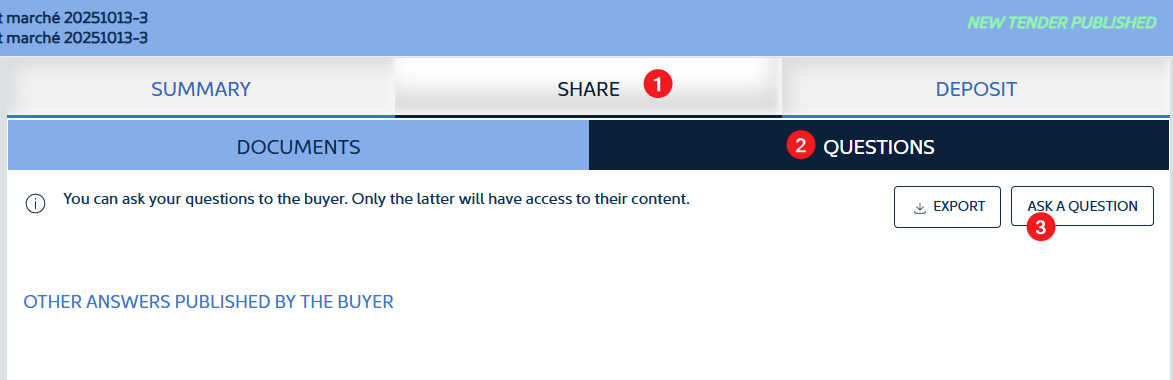
To ask a question about a consultation, you must log in as a supplier and then go to the consultation.
- Click on DOCUMENTS AND QUESTIONS
- Then click on QUESTIONS
- Finally, click on ASK A QUESTION and enter your question
How can I ensure that future users are linked to my company?
To ensure that new users are automatically grouped with your company when they register:
- It is essential to use the same company ID (SIRET number for French companies, intra-community VAT number for companies in the European Union outside France, etc.) as the one already registered with SafeTender.
- They should preferably have an email address with the same domain as the first registered user. The domain of an email address is what comes after @ (e.g. @lademat.pf). If the domain is different, the first user registered for the company must authorise the other users in the Sourcing module (https://sourcing.safetender.com).
This allows the platform to associate accounts with the same entity.
Does my registration on the SafeTender platform automatically give me access to the Sourcing platform?
When you register your company on the SafeTender platform for the first time, you automatically register your company on the Sourcing platform. You will then receive two password initialisation emails:
- An email to initialise your password on SafeTender
- A second email to initialise your password on Sourcing as your company’s account administrator.
The login is the same for both platforms.
If a second user registers for your company, they will only receive one email to initialise their password on SafeTender.
If a second user registers for your company, they will only receive one email to initialise their password on SafeTender.
I cannot reset my password
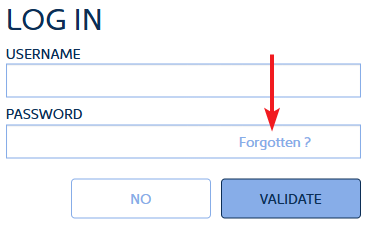
To reset your password, click on Forgotten? next to the password field.
You will then be asked to enter:
- The country of the company (as indicated during registration)
- Depending on the country, you will be asked for the company ID. For France, this is the SIRET number. It must be the SIRET number provided during registration
- Finally, you must enter the email address provided during registration
If all this information is correct, an email will be sent to reset your password. This email also contains your login ID.
If you made a mistake in your email address when registering, you will not be able to reset your password. In this case, please contact our support team.
Please do not hesitate to contact our support team if you encounter any problems.
Why can’t I log in?
To log in, you need a login name and password.
Please note: your login name may be different from your email address.
To reset your login details, click on Forgotten? in the password text box.
Can I change my password?
Yes. You have two options:
- You can request a password reset link. You will receive a link by email to reset your password.
- Or, if you are having difficulties, our support team can assist you directly in changing your password, in cooperation with you.
Je ne parviens pas à réinitialiser mon mot de passe
Pour réinitialiser le mot de passe, il faut cliquer sur Oublié ? au niveau du mot de passe.
Il vous est alors demandé de renseigner :
- Le pays de l’entreprise (indiqué au moment de l’inscription)
- En fonction du pays, il est demandé l’identifiant de l’entreprise. Pour la France le numéro de SIRET. Ce doit être impérativement le numéro de SIRET renseigné à l’inscription
- Enfin, il faut renseigner l’adresse mail indiqué au moment de l’inscription
Si toutes ces informations sont correctes, un mail est envoyé pour réinitialiser le mot de passe. Ce mail contient également l’identifiant de connexion.
Si vous avez fait une erreur sur votre adresse mail au moment de l’inscription, vous ne pourrez pas initialiser votre mot de passe. Vous êtes invité dans ce cas à contacter notre support.
N’hésitez pas à contacter notre support pour tout problème que vous rencontriez.